
TheLysts 1.4: AI Import muda a forma de criar listas
A versao 1.4 introduz o AI Import como uma mudanca estrutural na forma de criar listas dentro da TheLysts.
Os utilizadores ja nao precisam reconstruir manualmente conteudo que ja encontraram noutros sitios. Com AI Import, qualquer URL, imagem ou PDF pode tornar-se instantaneamente uma lista estruturada e editavel.
Este lancamento posiciona a TheLysts como a primeira plataforma em que a criacao de listas comeca fora da app.
Guardar na TheLysts a partir de qualquer lugar
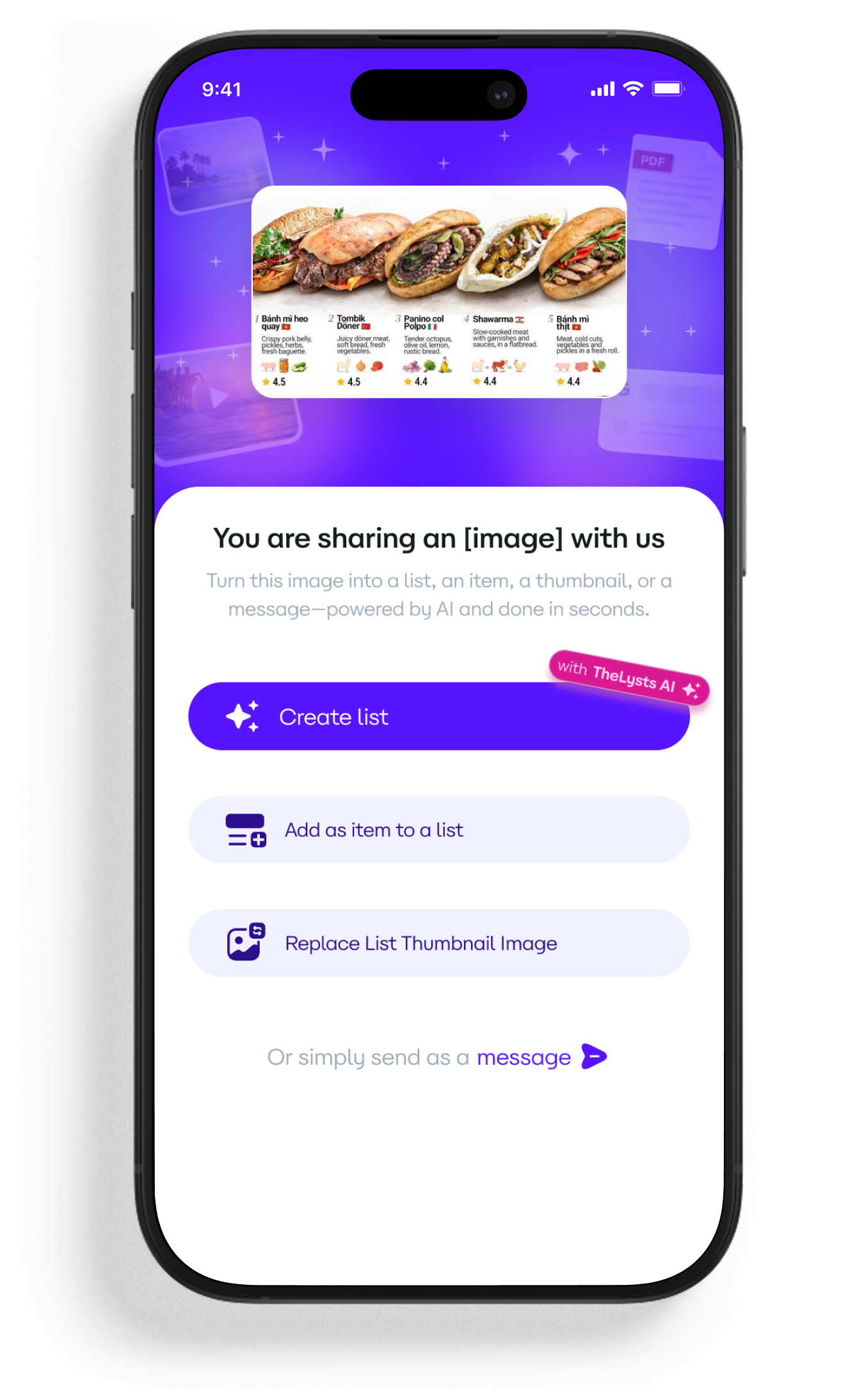
A TheLysts agora integra diretamente com o menu Partilhar do Android.
A partir de qualquer app no telefone, pode:
- Partilhar um link de website
- Partilhar um screenshot
- Partilhar um PDF
- Enviar uma imagem da galeria
Toque em:
Partilhar -> TheLysts -> Escolher acaoA criacao deixa de comecar com um ecra em branco. Comeca com conteudo real.
O que acontece depois de partilhar?
Quando o conteudo e partilhado para a TheLysts, escolhe o que fazer a seguir.
1. Criar uma lista (com IA)
A IA da TheLysts analisa o conteudo e cria automaticamente uma lista estruturada.
- Deteta itens individuais
- Extrai nomes e detalhes principais
- Organiza o conteudo de forma limpa
- Gera um rascunho totalmente editavel
A maioria das listas e gerada em menos de um minuto.
O resultado e totalmente editavel para refinar, reordenar e enriquecer.
2. Adicionar como item
Em vez de criar uma nova lista, pode:
- Adicionar o conteudo partilhado a uma lista existente
- Criar uma lista nova instantaneamente
- Continuar colecoes estruturadas de forma incremental
3. Substituir capa da lista
Imagens partilhadas podem tornar-se instantaneamente:
- Miniaturas de lista
- Capas atualizadas
- Melhorias visuais para listas publicas
4. Enviar como mensagem
Tambem pode enviar conteudo diretamente pelo chat da TheLysts em vez de converter em lista.
Porque esta funcionalidade muda a categoria
A maioria das apps exige insercao manual de dados.
A maioria das ferramentas de produtividade sao ecossistemas fechados.
A maioria das redes sociais nao estrutura conteudo.
A TheLysts 1.4 liga consumo de conteudo a publicacao estruturada.
Em vez de copiar informacao:
- Captura
- Estrutura
- Possui
- Publica
Isto reduz o atrito entre descobrir e criar.
Feito para velocidade, controlado por si
Cada lista gerada por IA e:
- Privada por defeito
- Totalmente editavel
- Acessivel imediatamente no seu perfil
Decide quando e se quer tornala publica.
Exemplos de uso
- Screenshot "Top 10 sandes em Berlim" -> lista estruturada instantanea
- URL de blog de viagem -> lista de recomendacoes editavel
- PDF de guia de compra -> comparativo organizado
- Pagina de produto -> adicionar diretamente a lista de equipamento
O conteudo ja existe. Agora passa a ser seu.
Impacto estrategico
O AI Import transforma a TheLysts de ferramenta de listas para motor de captura e estruturacao.
Permite:
- Criacao de conteudo mais rapida
- Maior volume de publicacao
- Menos friccao
- Mais retencao
- Diferenciacao clara no mercado
A versao 1.4 define um novo fluxo.
Perguntas frequentes
O que e AI Import na TheLysts 1.4?
AI Import permite partilhar URL, imagem ou PDF diretamente para a TheLysts e converter automaticamente em lista estruturada e editavel.
Como uso o AI Import?
Abra qualquer imagem, link ou PDF, toque em Partilhar, selecione TheLysts e depois escolha a acao (Criar lista, Adicionar como item, Substituir capa ou Enviar como mensagem).
Quanto tempo demora para gerar uma lista?
A maioria das listas e criada em menos de um minuto, dependendo da complexidade e tamanho do conteudo.
Posso editar a lista gerada por IA?
Sim. Cada lista gerada e totalmente editavel. Pode alterar titulos, descricoes, ordem e adicionar ou remover itens.
As listas geradas por IA sao publicas?
Nao. As listas sao privadas por defeito. Pode tornalas publicas a qualquer momento.
Que tipos de ficheiro sao suportados?
- URLs de websites
- Imagens e screenshots
- PDFs
AI Import funciona apenas para listas novas?
Nao. Tambem pode adicionar conteudo partilhado como item numa lista existente ou usar para substituir a capa da lista.
Ja disponivel na versao 1.4
AI Import (URL, imagem, PDF) ja esta disponivel.
Abra qualquer conteudo.
Toque em Partilhar.
Selecione TheLysts.
Escolha a acao.
De qualquer lugar para lista estruturada, em segundos.
Descarregue a TheLysts

